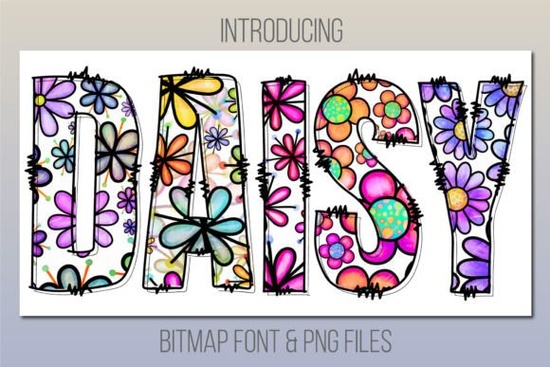
Daisy Font is a friendly daisy print color font that brings a playful, jolly touch to any project. Unlike standard fonts, this one includes built-in daisy motifs and color details, so you don't need to add extra graphics or layer styles. It works best for designs that need a cheerful, handcrafted vibe think greeting cards, kids' party invitations, or summer-themed merchandise.
What software works with Daisy Font?
This is probably the first thing you want to check. Daisy is a color font, also called a bitmap font, and it requires specific software to run. You can use it with:
- PhotoShop CC 2017 or newer
- Illustrator CC 2018 or newer
- InDesign CC 2019 or newer
- MacOS apps like Fontbook, Pages, and Keynote
If you're using a different program, don't worry the product also includes PNG files in the Bonus Files section. Those PNGs work in almost any design software, including Canva, Procreate, and even Microsoft Word. So even if your go-to app isn't on the list, you still have a usable option.
Can I use Daisy Font for print-on-demand projects?
Absolutely. Print-on-demand sellers often look for unique, eye-catching fonts that stand out on products. A daisy print color font like this one works beautifully on apparel, tote bags, mugs, and phone cases. The built-in floral details mean you don't need to add separate flower graphics, which saves time and keeps your design clean.
Just keep in mind: if you're using a POD platform like Printful or Printify, you'll likely upload your design as a PNG. That's where the bonus PNG files come in handy. You can type out your text in a compatible program first, export it as a PNG with a transparent background, and then upload it to your POD platform. This workflow is straightforward and works for most sellers.
How do I install and use a color font like Daisy?
Installing a color font is similar to installing a regular font, but there are a few extra steps to make sure the color features show up correctly:
- Download the font files from Creative Fabrica. You'll get both the color font file and the bonus PNGs.
- Install the color font on your computer. On Mac, double-click the file and click "Install Font." On Windows, right-click and select "Install."
- Open your compatible software (PhotoShop, Illustrator, InDesign, or a MacOS app).
- Type your text and select Daisy Font from the font menu. The color and daisy details should appear automatically.
If the color doesn't show up right away, make sure you're using a compatible version of the software. Also, check that your document color mode is set to RGB, not CMYK. Color fonts rely on RGB color space, so switching to the wrong mode can cause issues.
What kind of projects suit a daisy print color font?
This font has a very specific personality it's cheerful, playful, and slightly whimsical. Here are some project ideas where it fits naturally:
- Children's birthday invitations – The daisy details add a handmade feel
- Summer sale banners – For boutiques or farmers' markets
- Greeting cards – Especially "thank you" or "get well" cards
- Social media graphics – Instagram posts or Pinterest pins with a spring theme
- Wall art printables – Uplifting quotes with a floral touch
- Scrapbooking titles – For memory keeping projects
Because the font includes actual daisy shapes, it works best at medium to large sizes. At very small sizes, the details might become hard to read, so keep that in mind when designing. For small text, consider using the bonus PNGs instead.
What if my software isn't compatible?
This is a common concern, especially for Cricut users. Daisy Font is not compatible with Cricut Design Space. But again, the bonus PNG files are your workaround. You can create your design in a compatible program, export it as a PNG with a transparent background, and then upload it to Cricut Design Space as an image.
The same goes for other software like Silhouette Studio, Canva (free version), or Affinity Designer. The PNG files give you a lot of flexibility, so you're never locked out of using this font in your workflow.
Where can I find other colorful fonts like Daisy?
If you enjoy using color fonts, you might want to browse more options on Creative Fabrica. They have a large selection of colorful fonts that work similarly. Whether you need a romantic script, a bold display font, or another floral style, there's plenty to explore.
For reference, you can check out the Daisy Font page directly to see more details and customer reviews.
Quick checklist before you buy
- ✅ Check that your software is compatible (PhotoShop CC 2017+, Illustrator CC 2018+, InDesign CC 2019+, or MacOS apps)
- ✅ If you use Cricut or other non-compatible software, plan to use the bonus PNGs
- ✅ Think about your project type – this font works best for cheerful, playful designs
- ✅ Download and test the font before starting a large batch of designs
Daisy Font is a solid choice if you need a ready-made floral typography solution without creating daisy graphics from scratch. Just match it with the right software and project, and you're good to go.
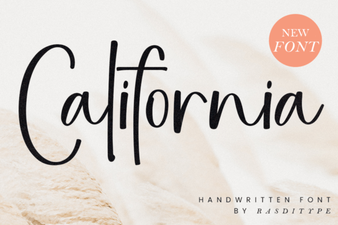 The California Font: a Guide to Design & Style
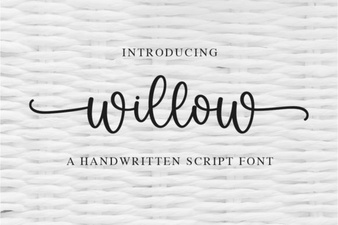 Willow Font: Elegant Scripts for Your Creative Projects
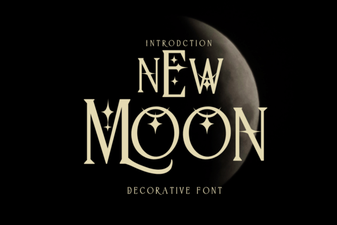 New Moon Font: Creative Ideas & Design Applications
 Shina Qatline: a Unique Arabic Display Font
 Inspiring Butterfly Lettering Fonts & Design Projects
 Sparky Dream Font: Creative Typography Inspiration